Technology that frees operations
01 · Hotel cloud

The hotel day, on a system

From booking and reception through the stay to checkout, for one hotel or a chain.

Maitian Cloud PMS

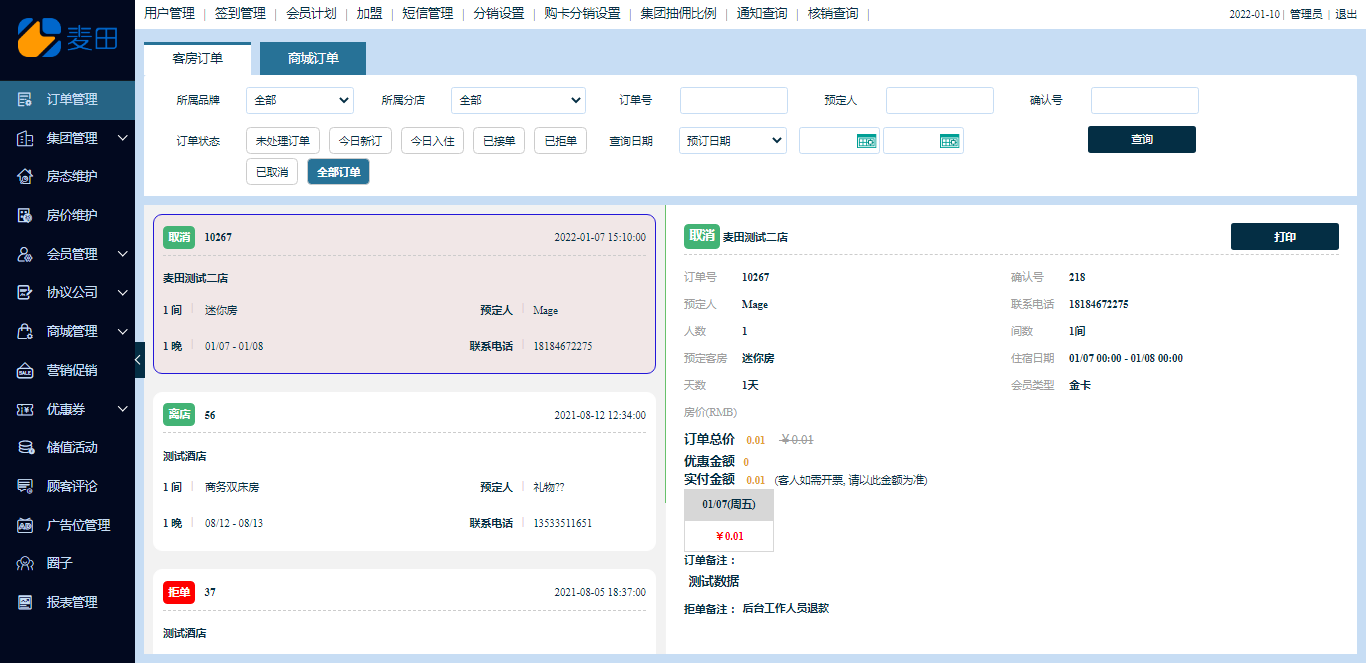
Maitian Cloud PMS is the hotel system in the cloud. It covers reception, cashier, rates, groups, corporate accounts and agents, meetings, restaurant charges to the room, inventory, and operating reports. It fits chain hotels, upscale hotels, and independent hotels.

  • Built for chains, and it also fits upscale work. One hotel is already the group edition. A single hotel and the group view switch without a second system.
  • QR payment and refunds back the same way, plus city-ledger accounts. Stronger rate control, group reconciliation, and finance checks.
  • Direct links to Ctrip, Meituan, Fliggy, and other main OTAs. OpenAPI for locks, kiosks, and smart rooms.
  • Cloud software costs less to run. It can also be adapted for domestic IT stacks or installed privately, including rules state-owned companies ask for.
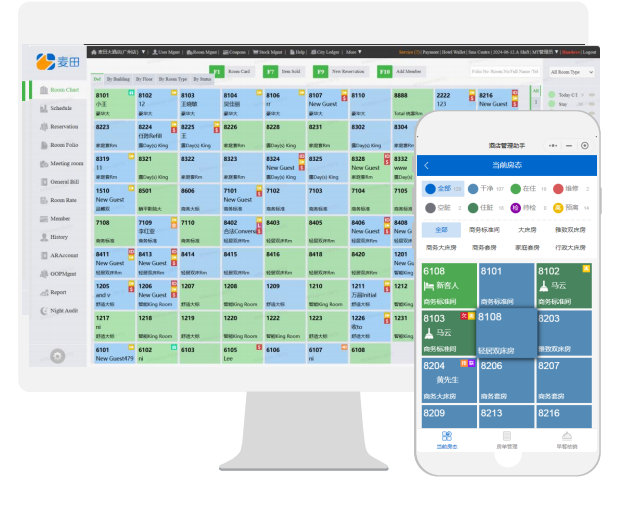
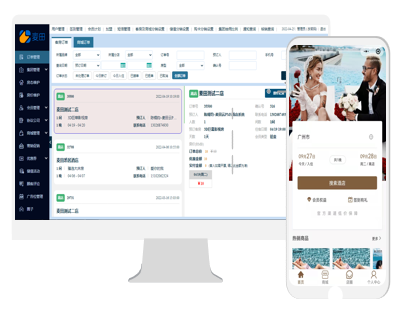
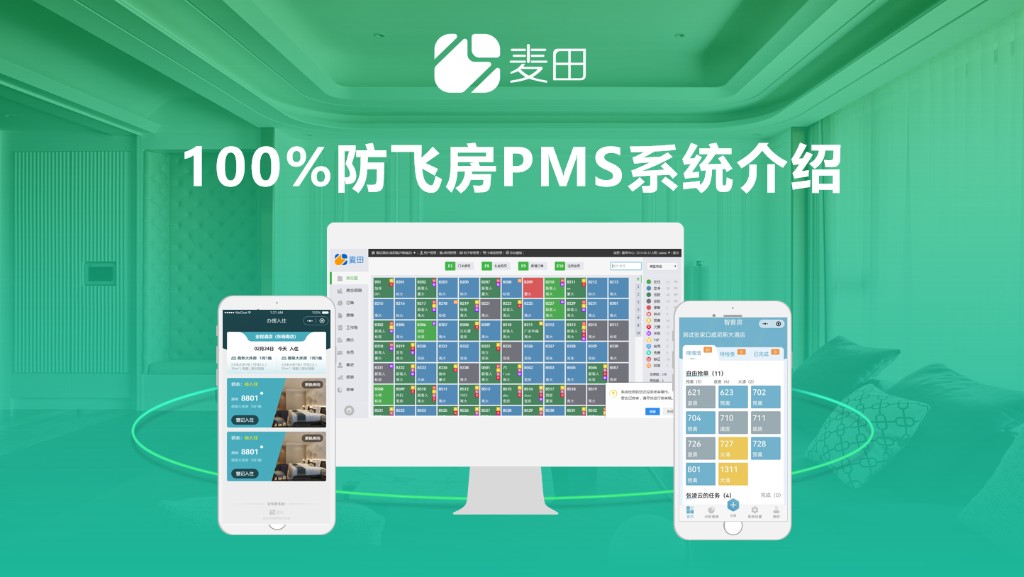
Maitian Cloud PMS room board on desktop and phone

Mobile PMS

The hotel day is not stuck at one desk. Managers see the numbers as they decide. Staff handle guests and rooms on the move.

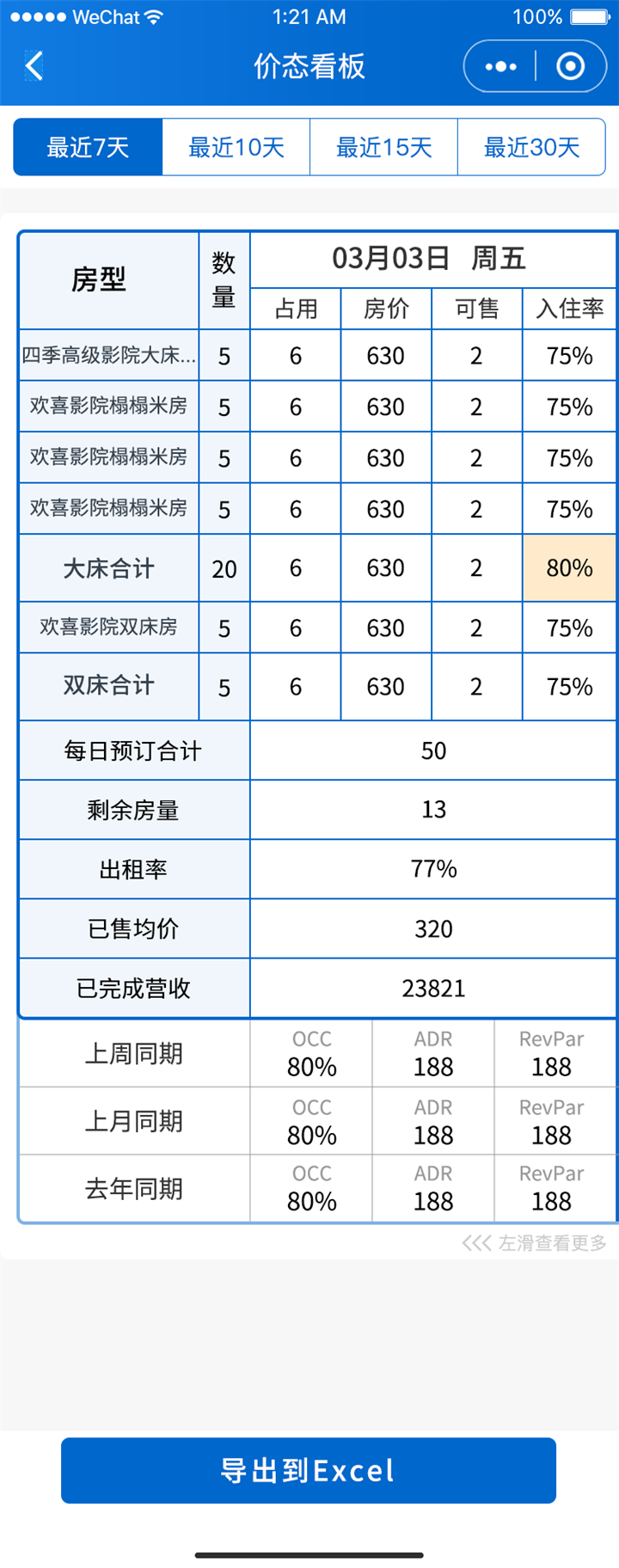
  • See room status, occupancy, and RevPAR at any time, and get a warning when the hotel is full or something looks off.
  • Check in and take a deposit in the lobby or on the floor. Housekeeping receives the room task and the cleaning status stays in sync.
  • Settle OTA orders and issue e-invoices on the phone. It stays in sync with the desktop, including a group permission view.
Mobile PMS operating numbers

Central reservations, CRS

Manage availability, rates, and orders in one place, across the website, the mini program, and OTAs. It fits hotels that need one inventory, with fewer oversells and fewer rooms left unsold by mistake.

  • Connect several OTAs and the hotel's own channels, so more of the demand is visible and more of it becomes an order.
  • Room status, rates, and orders sync both ways with PMS and CRM, so the channels are less likely to disagree.
  • Several rate codes for the group or the hotel, and batch changes, for low season and high season.
  • One place for each hotel's basics, channels, and orders, so adding a hotel does not start from a blank sheet.
CRS orders and channels

Member CRM

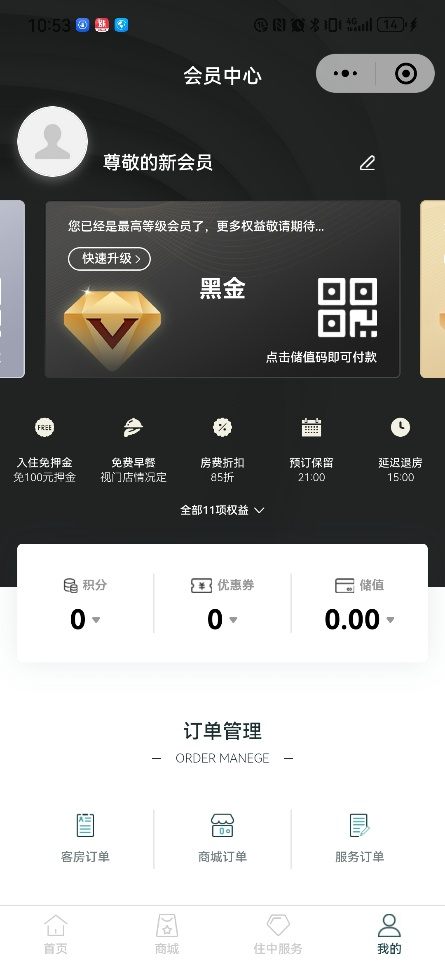
Hotel member CRM: find guests, keep them, and bring them back. It shares orders with Cloud PMS and direct sales, so the hotel depends less on OTA commission and more of the stays are its own, including repeat stays.

  • Silver, gold, and platinum benefits: a rate discount, breakfast, VIP reception, and similar.
  • The mini program closes the loop from a card opened at the hotel to a booking made online, so the guest stays with the hotel.
  • Points redemption, stored-value gifts, coupons, and birthday offers.
  • Reach people by age, spending habit, and place, and use that for both staff and members.
Member CRM

Housekeeping

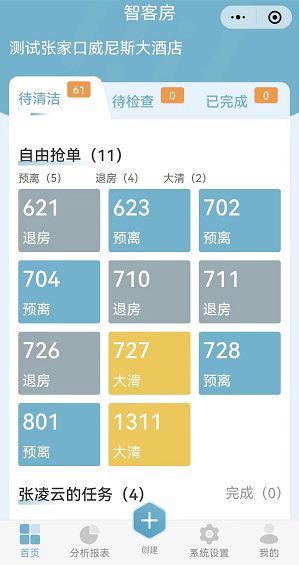
Room tasks are assigned and checked online. The desk can see how far the cleaning has gone.

  • Assign rooms online, or let staff take the next one, so the wait to assign a room is shorter.
  • Clean, inspect, score. The loop is there so a room is not sold dirty, and cleaning does not sit past its time.
  • The desk and housekeeping see the same room status, for a busy arrival and for a chain that wants one way of working.
  • Reports from more than one angle, quick to put in, for one hotel or a chain.
Housekeeping tasks

Self check-in

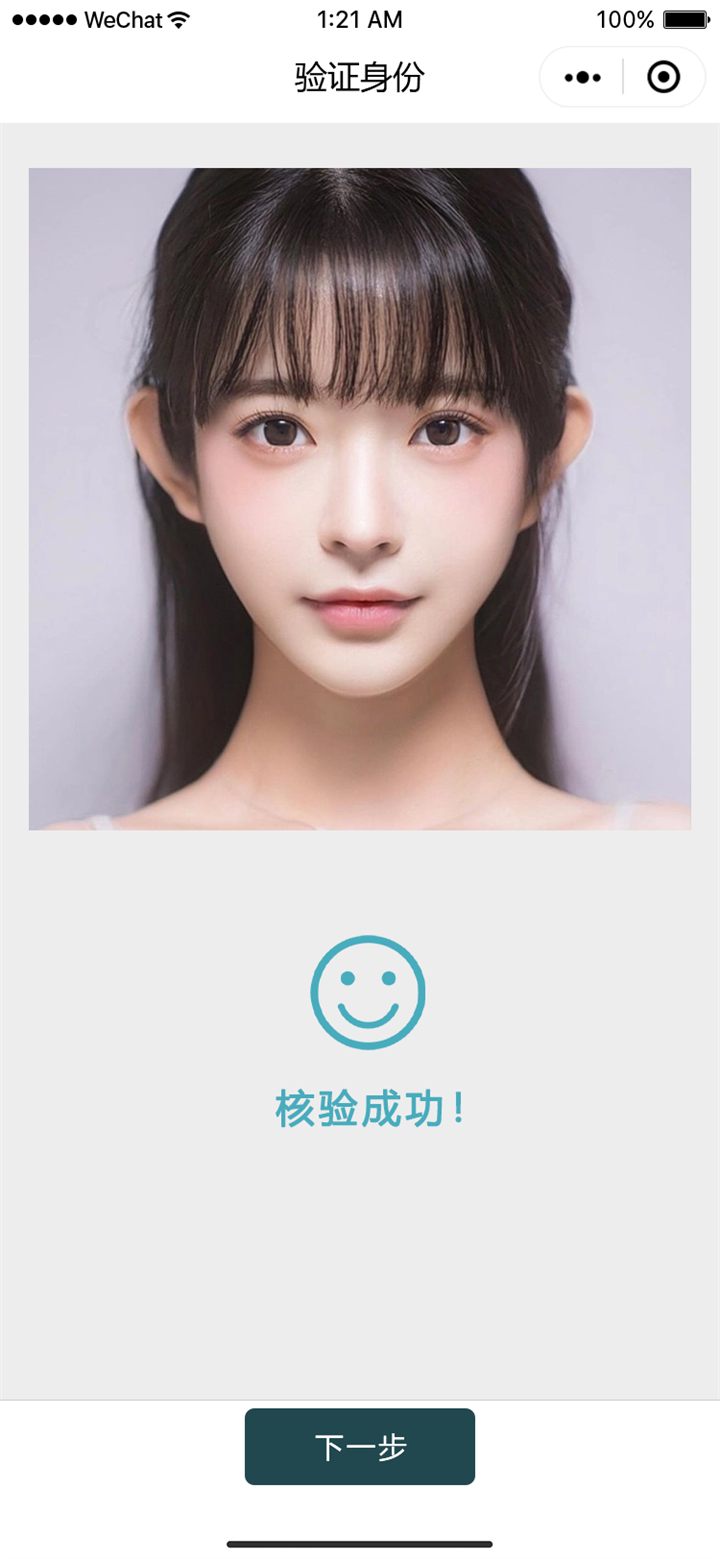
QR check-in and the kiosk are used together. The desk queue is shorter, and the night can run with fewer people.

  • Scan to check in, read the ID, and issue the key faster, so the line is shorter.
  • Orders from OTAs and PMS stay in sync. Nobody has to type them in again.
  • Self-service booking, extension, checkout, and a faster check-in for groups.
  • After the ID is read, the required public-security filing can be sent automatically where that province supports it.
Self check-in and guest service

Cloud inventory

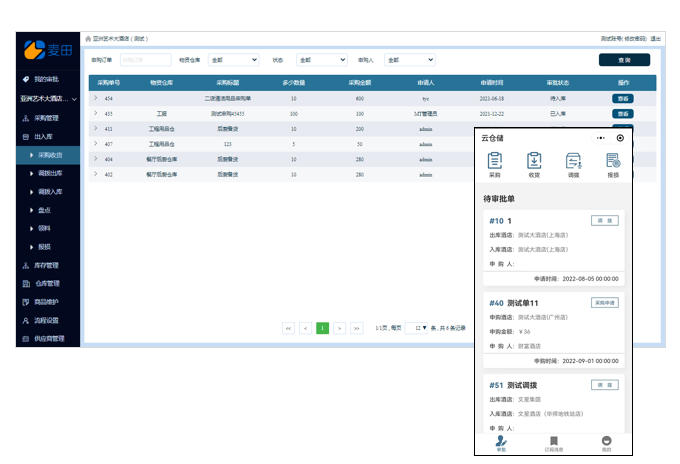
Follow the stock from end to end, and do the approvals on a phone, so the count is less messy, approvals wait less, and moving stock between hotels is easier. It fits midscale hotels and large chains.

  • Approve a purchase or a transfer on the phone, instead of passing paper.
  • Purchasing, stock in and out, and counts. The stock position can be looked up as it changes.
  • Move supplies between hotels, and keep the in-and-out record in sync.
  • Count sheets that match the shelves to the numbers. Enough to do the job, and not hard to learn.
Inventory on desktop and phone

In-stay requests

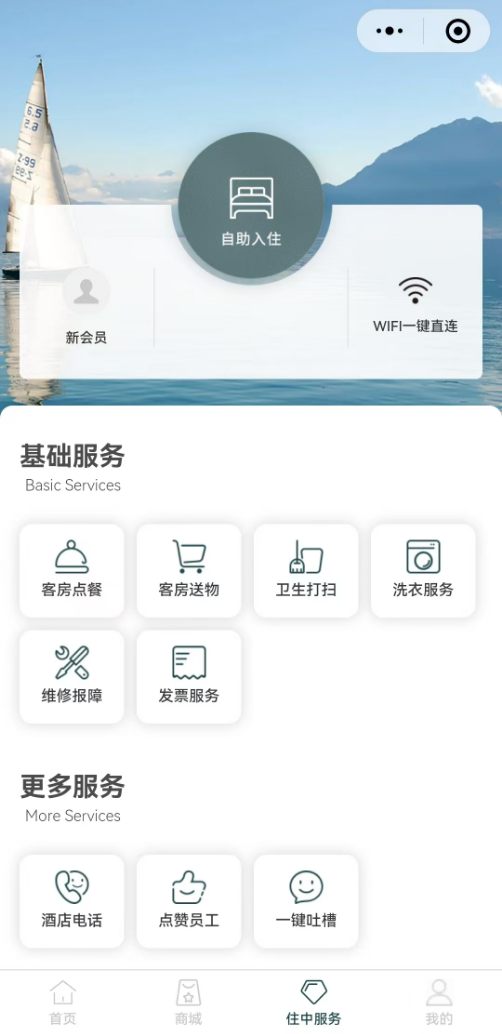
In-stay requests go online: room dining, deliveries, cleaning, laundry, repairs, and invoices reach the right person in one step, so the path is shorter.

  • Basic requests and extra requests are separated, and the guest submits them.
  • A request goes to the role that should do it, so fewer are missed and fewer arguments start.
  • It can work with self check-in, one-tap Wi-Fi, and member benefits.
In-stay requests
02 · Restaurant cloud

Hotel restaurants, on a system

Ordering, payment, and redemption, together with the room folio, so the meal moves faster and the guest has less to chase.

Restaurant POS

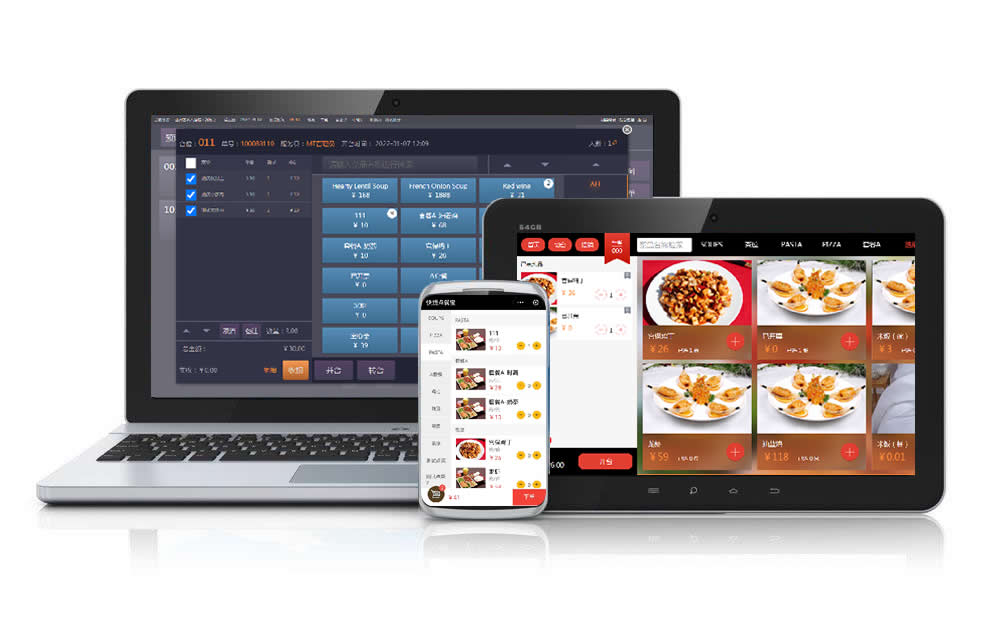
Breakfast, meals, and leisure. It posts to the room through PMS. QR or tablet orders print in the kitchen, so the same work takes fewer people.

  • Room and restaurant charges sit together, so checkout is one bill.
  • QR or iPad ordering plus an automatic kitchen print, so fewer tickets are wrong and the servers carry less.
  • Guests join and store value by scanning, so the hotel keeps the relationship and the cash comes in earlier.
  • Revenue and bestseller reports, with Chinese and English for hotels that receive overseas guests.
Restaurant POS on several screens

QR ordering

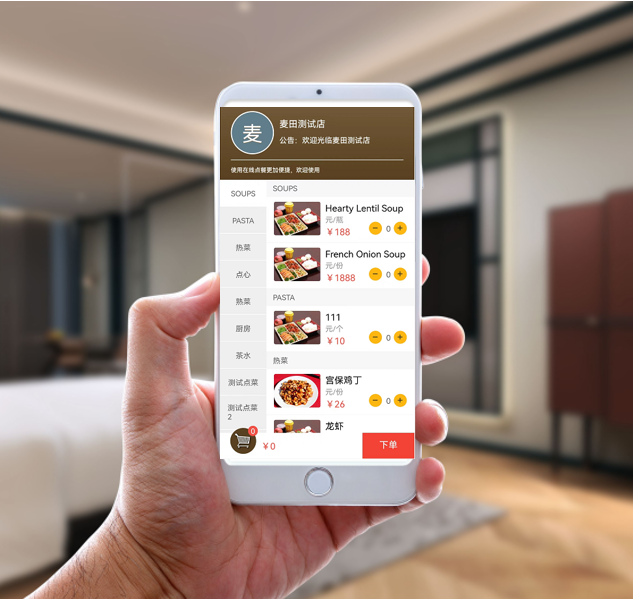
The restaurant desk: guests order themselves, people at the same table add dishes, and the menu goes straight to POS and the kitchen printer.

  • Scan to order, and add dishes later. The wait is shorter and fewer staff are needed to take the order.
  • Make the QR codes in a batch by room or by table. Putting them out does not cost much.
  • The order goes from the guest to the kitchen without someone repeating it, so less is lost in the telling.
  • Guests can check the detail and pay online, which makes the meal easier.
QR ordering on desktop and phone
03 · Revenue cloud

More direct revenue, and a closer look at the rate

Depend less on OTAs. Build the hotel's own guests and direct sales, and use the numbers for price and inventory.

Direct-sales platform

A direct-sales center for WeChat and Douyin: gather guests, keep them, and bring them back. Scattered demand becomes the hotel's own, and the order writes back to PMS.

  • One code brings guests from several channels, before the stay, during it, and after.
  • Room booking, the shop, presale packages, vouchers that work across hotels, distribution, and commission paid out.
  • Members, corporate accounts, stored value, and points in one place, so a chain can sell across hotels and share the data.
  • Orders, members, and service data become the operating measures.
Direct sales on desktop and phone

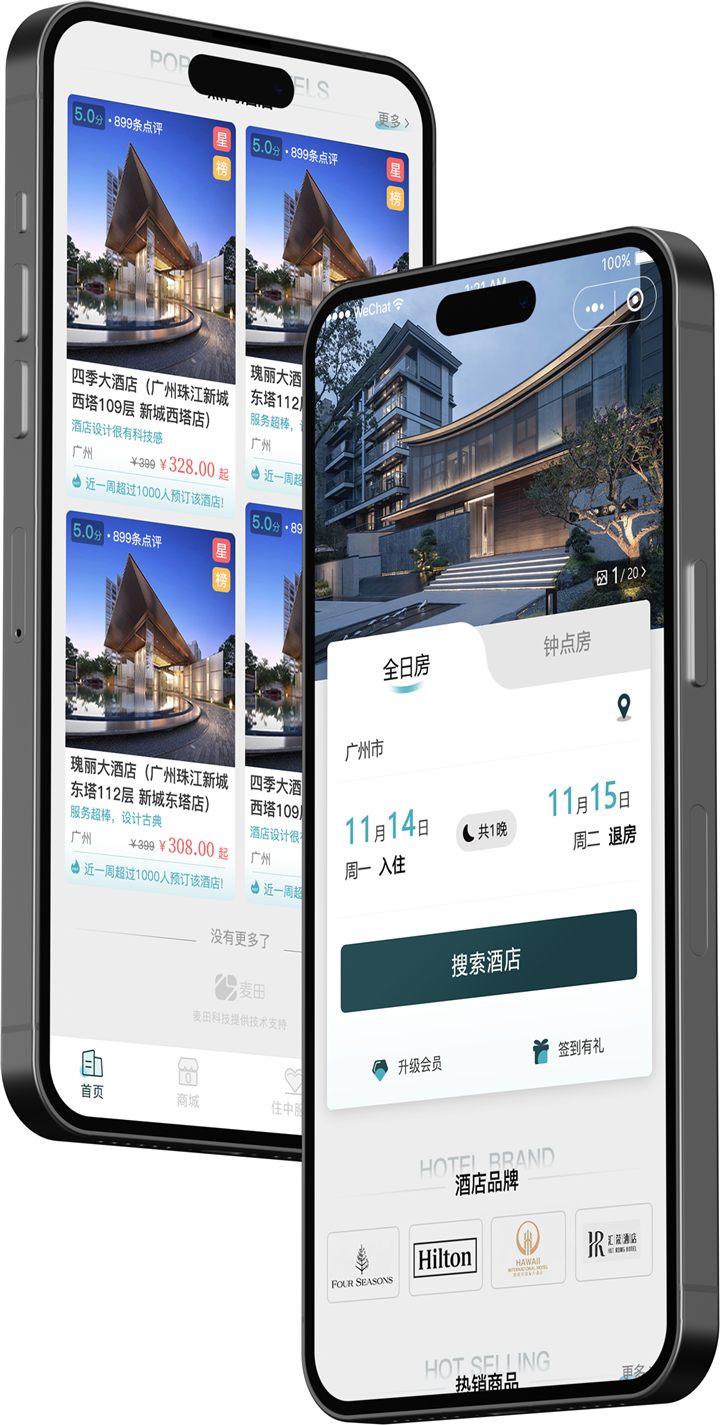
Direct-sales mini program (WeChat)

The hotel's own door for direct sales. Rooms and the shop sell together, member benefits are shown first, acquiring a guest costs less, and more of them book.

  • Overnight rooms, day-use rooms, and bookings for members and corporate accounts.
  • The shop sells physical and virtual goods, and partner merchants redeem them.
  • Points redemption, stored value online, presale room nights, and vouchers that work at more than one hotel.
  • Distribution posters and a personal QR code. Commission can be paid to a WeChat wallet.
WeChat direct-sales mini program

Revenue management

Use the numbers for revenue: set the rate with a reason, manage inventory on purpose, and watch it as it moves, so the decision is not only a habit.

  • Rate suggestions use the live room board and the same period last time. A floor stops a price that would break the rule.
  • Inventory by room type, so slow types sell more often and empty rooms are wasted less.
  • The numbers refresh through the hour, with a warning when something is off, so the manager can change course quickly.
  • Operating reports for the day, the week, and the month, in a form a chain can copy.
Revenue rate board
04 · Management cloud

Group control, from the first look to daily operations

Standards, quality checks, tasks, development, and fit-out, with operating numbers and group purchasing in the same picture. Head office adds fewer people, the standard can be copied, and the result can be seen.

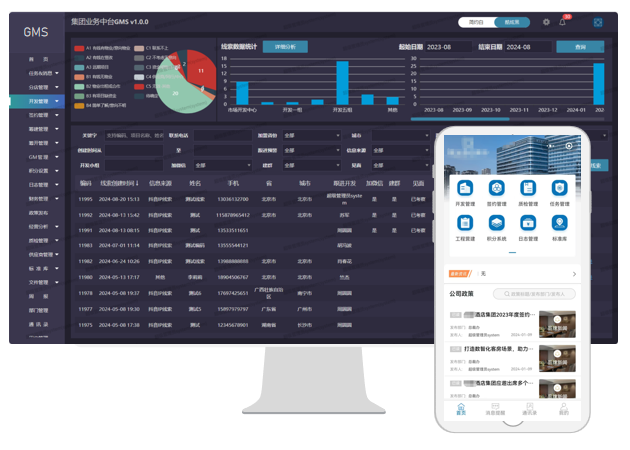
Group platform GMS

People, money, supplies, and process across the hotel's life: finding projects, approval, construction, opening and operating checks, and shared tasks. Built for management companies that want those in one place.

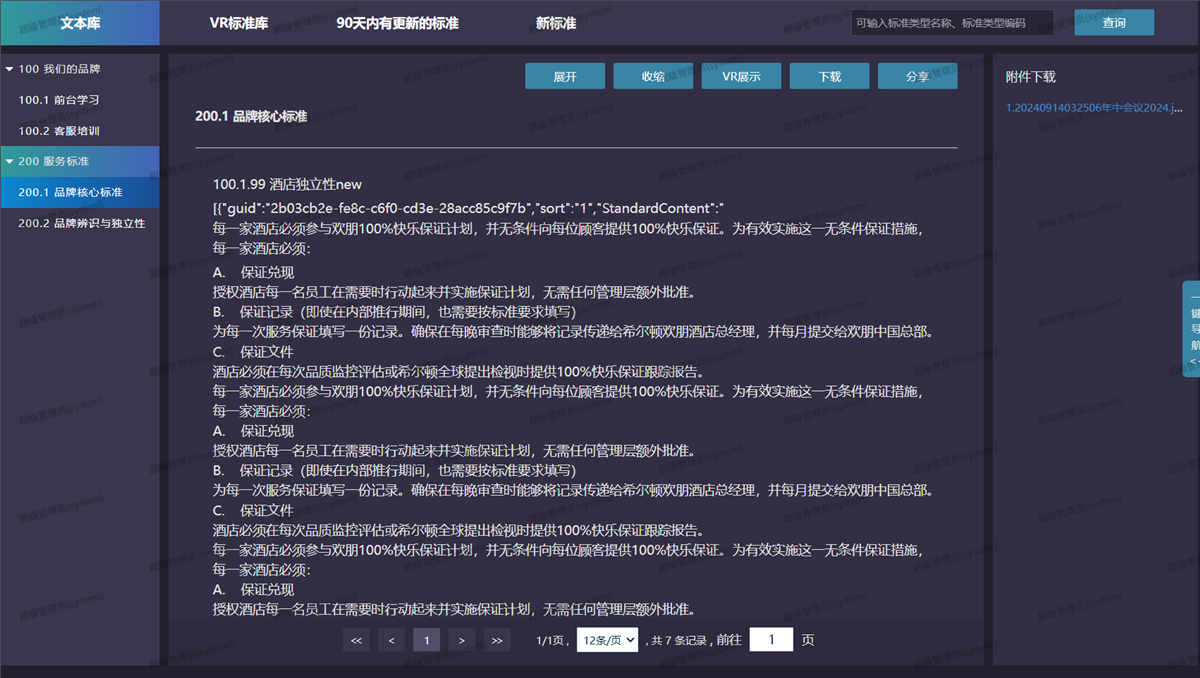
  • The standards library keeps what the brand has learned. Standards tie to check items. Brands can be kept apart.
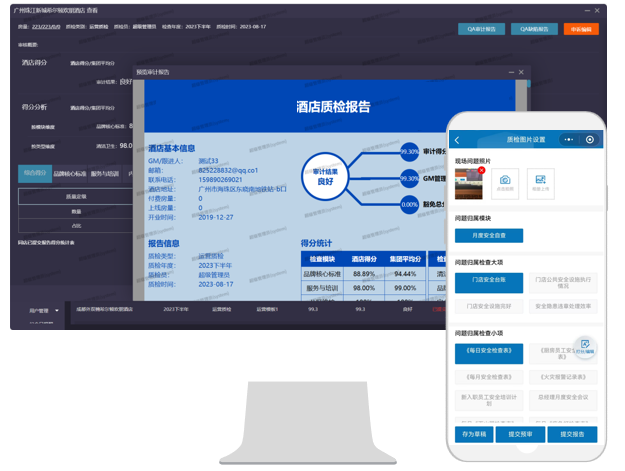
  • The quality loop: plan, score, the QA report, the fix, and a second look.
  • Receivables and payables calculated, overdue amounts watched, and settlement done to one rule.
  • Approvals, fit-out progress, tasks, and the daily note, so head office sees more without adding a matching number of people.
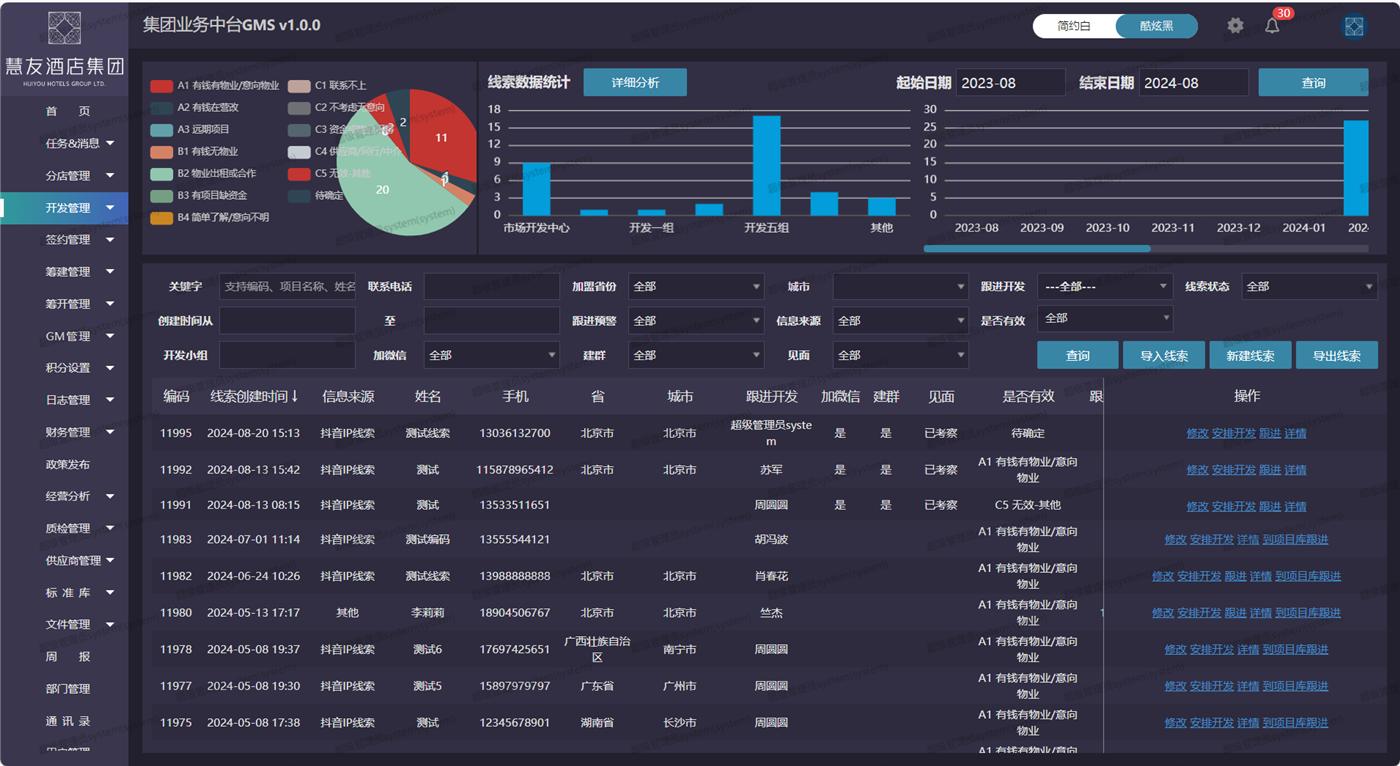
GMS development board

Standards library

The base for a group's standards: brand, facilities, and operations stored in one place, and tied closely to the quality checks.

  • Operating, service, and facility standards together, so hotels of the same brand feel like the same brand.
  • Standards and check items are tied, so a fix has something to point at.
  • Download, share by permission, and a reminder when it changes, so people spend less time hunting for the current copy.
  • Templates can be kept apart by brand, so hotels can differ where they should and the group still holds one line.
Standards library

Quality inspection

Checks for construction, opening, and daily operations. Plan, do, report, fix, and look again.

  • Three levels: group, brand, and hotel. Templates can be kept apart.
  • Score from photos on the phone. The desktop adds the score and writes the report.
  • Scoring by a hard line, by points off, or by a spot check, for different kinds of inspection.
  • Compare hotels with each other, and one hotel with its own past, so quality is managed from the numbers.
Quality report on desktop and photos on the phone

Development

From the first lead, through follow-up and approval, to the signed file. The work is easier to start, and a project is harder to lose.

  • Shared leads and personal leads, graded, with a warning when a follow-up is late, so more of them convert.
  • Market notes, SWOT, and the investment view follow one form, and a project paper can be produced.
  • Permissions and team data are kept apart, so a lead is harder to grab and a project is harder to lose.
  • Project approval is online, and the path stays visible until it moves into fit-out.
Development board on desktop and the phone workspace

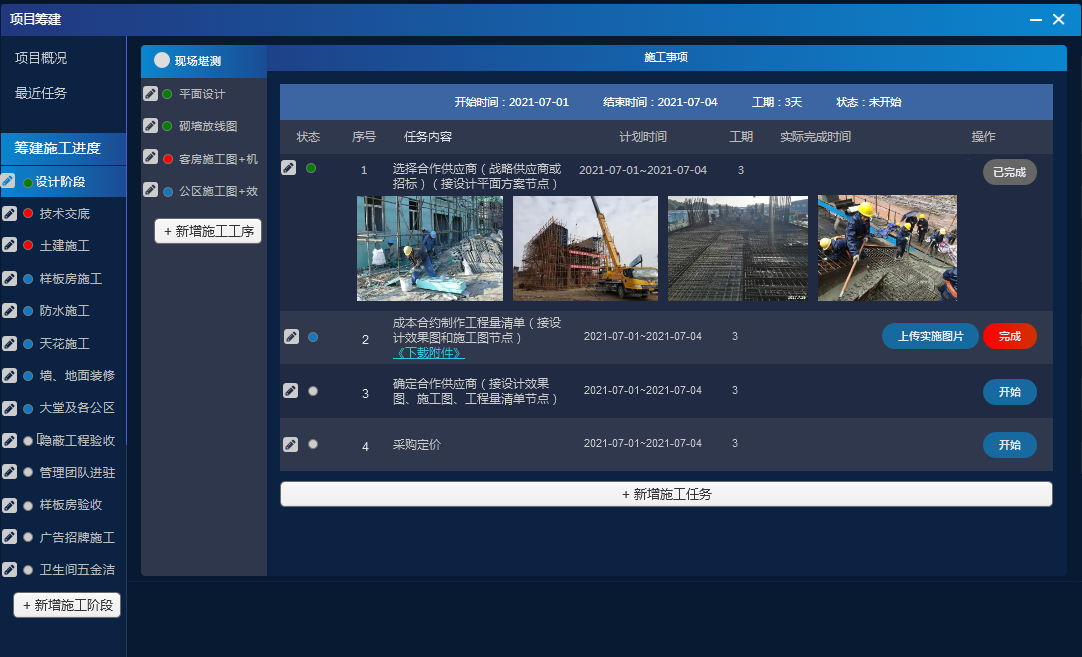
Construction and fit-out

See each fit-out's progress, shorten the cycle, and keep what was learned for the next hotel.

  • Design review, construction, and pre-opening: the stage and the time left are visible.
  • A warning when the schedule slips, and the process kept as data, so the management risk is lower.
  • Supplies, cost per room, and what was agreed with each supplier can be followed.
  • Progress is filled in on the phone, and the last hotel's way of doing it is there for the next one.
Fit-out progress

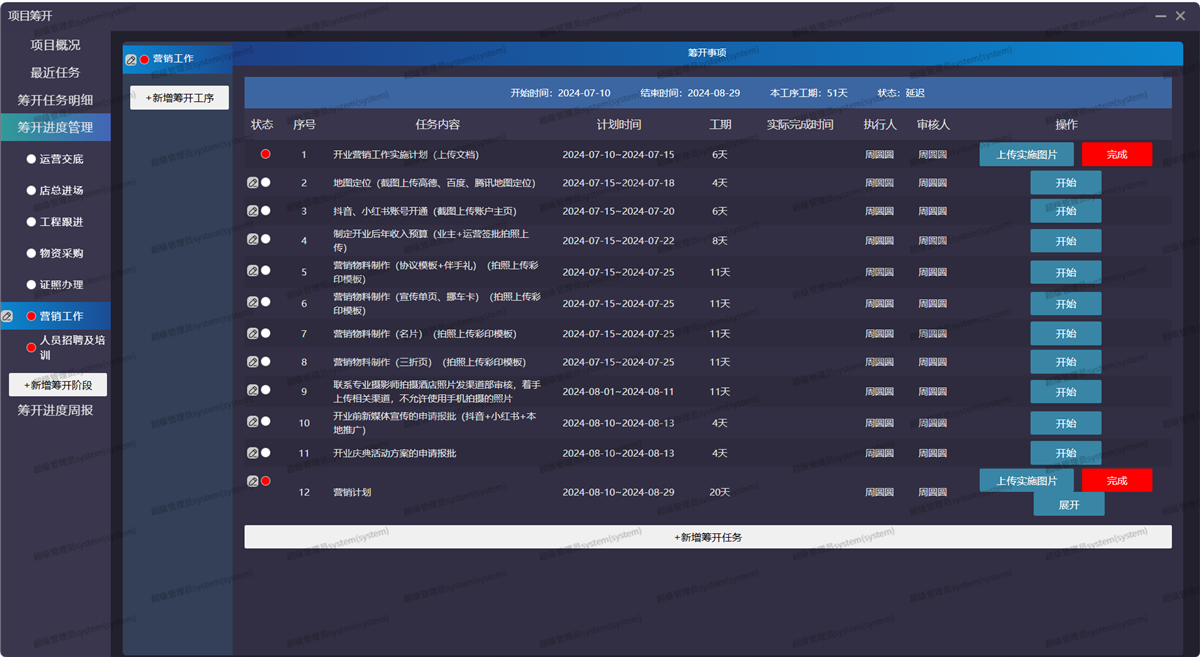
Pre-opening

The work before opening: the schedule is visible, tasks are split, and marketing and operations land together, so the opening stays on the plan.

  • Compare the plan with what has actually happened, and keep the pre-opening pace.
  • Handover, purchasing, licenses, and hiring each have an owner and a date.
  • Account setup, map location, and the materials used to market the opening.
  • A weekly note and area totals are produced, so people and supplies can be moved where they are needed.
Pre-opening

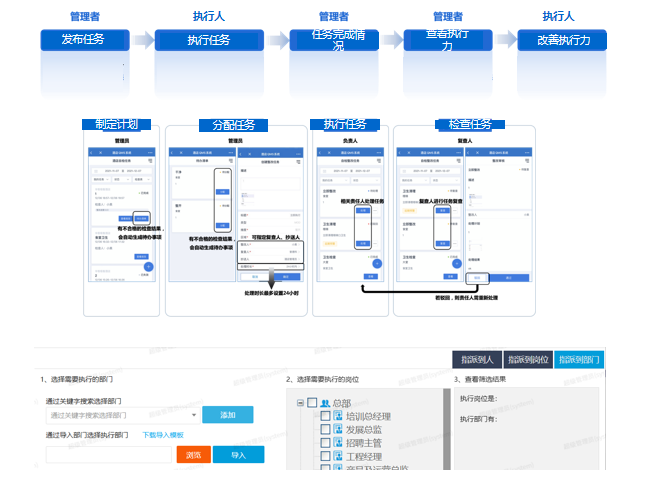
Tasks and follow-through

A task has a name on it. When it is due it is sent again. Finished work is checked. A late one raises a reminder.

  • Assign by department, role, or person, including when someone changes role or a new hotel opens.
  • Daily, weekly, and monthly tasks go out on their own, so someone does not have to assign the same job again.
  • Create, do, check, send back, fix. A late step can raise a warning.
  • Completion and similar reports show whether the work got done. The standard for the role is already in the task.
Tasks: the flow, on the phone and on the desktop

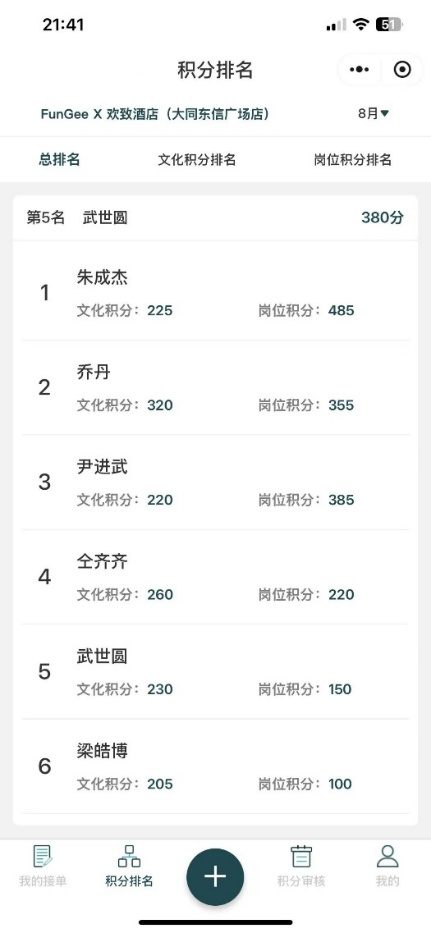
Staff points

Points for guest service and for helping the team: role points and culture points. The work becomes a number people can see.

  • Guest service is tied to points, so the consequence is clear and the response is more likely to be on time.
  • Culture points are for helping another role and for joining activities, so people feel they belong to the hotel.
  • Rankings and reports replace a vague comment, so staffing decisions have something to stand on.
  • Submit, review, and look up on the phone. The rules from the desk to management can be set for the hotel.
Staff point ranking

In-stay tools and the data platform

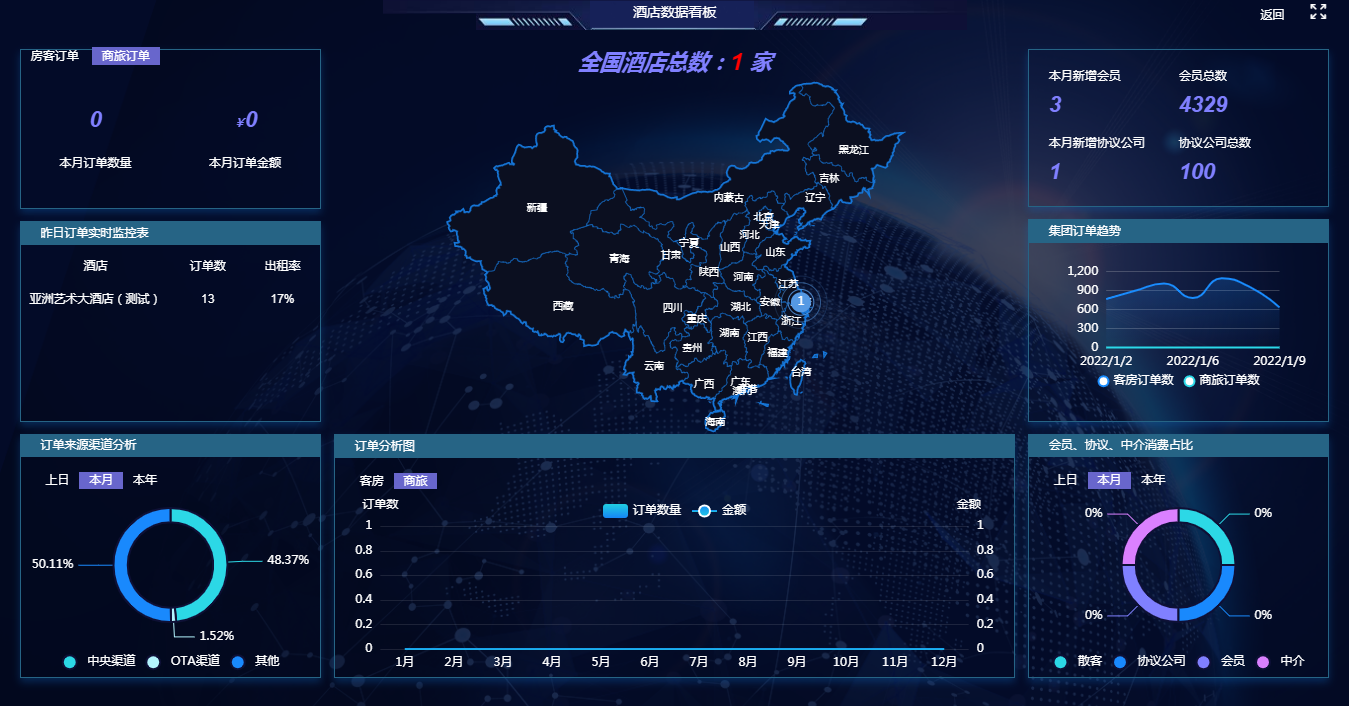
Operations, members, orders, and channels in one board. Cleaning and repair tickets, and outside devices, connect too, so a decision has a number behind it and a service can be followed.

  • A board for the country or for one hotel: orders, members, corporate accounts, channel mix, and similar.
  • Analysis and reports you can read, for the day, the week, and the month.
  • A closer look at members: who is active, and what they spend on.
  • Shared with PMS, CRS, and direct sales, so fewer systems sit alone.
Maitian Cloud hotel data board

Purchasing shop and group buying

Hotel purchasing: the group, the hotel, and the supplier in one path. Group buying lowers the price, the process is on the system, and the data can be traced.

  • Group buying and a hotel buying for itself. The amount needed up front is lower, and the return comes around sooner.
  • The whole purchasing path is on the system, so fewer items go to the wrong place and less time goes into explaining them.
  • Every purchase leaves a trail, with a quality check. It is easier to see, and the operating risk is lower.
  • It fits a new hotel and an old one, so the brand can add hotels and change the setup over time.
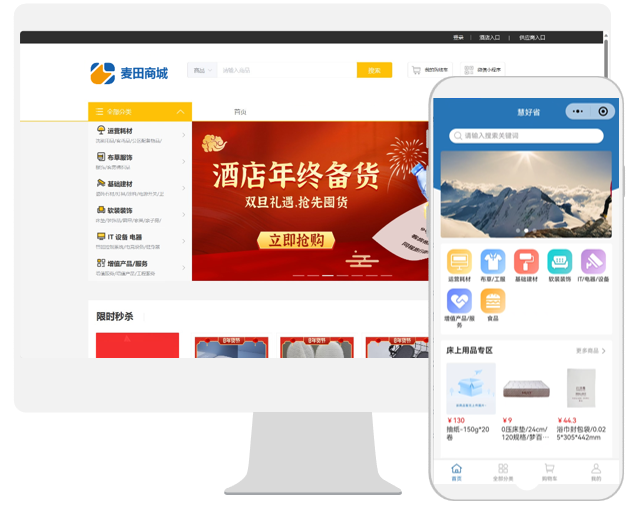
Purchasing shop on desktop and phone
05 · Smart cloud

Tools for specific hotel jobs

It sits beside Cloud PMS, membership, and quality checks. Kiosks, skipped-stay control, and inspections can draft a suggestion first. A person confirms before it runs.

Maitian AI

It sits beside Cloud PMS and membership. It can look up the business, draft a quality fix, and draft a member suggestion. Changing a number, and anything sent outside, needs a person.

  • Jobs that can be shown: a quality-fix draft, a member suggestion, and a look at odd operating numbers.
  • Changing a number and sending a notice stay inside permission and approval, and a record is kept.
  • The full set of jobs is on Maitian AI
Maitian AI across service and operating screens

Self-service hotels

Self check-in is the center. QR and the kiosk share the arrivals, so the desk is under less pressure. It fits a hotel with few staff, including at night.

  • Scan to check in, read the ID, and issue the key faster, so the line is shorter.
  • Connected to OTAs and PMS. Orders stay in sync, so less is typed by hand.
  • Self-service booking, extension, checkout, and a faster check-in for groups.
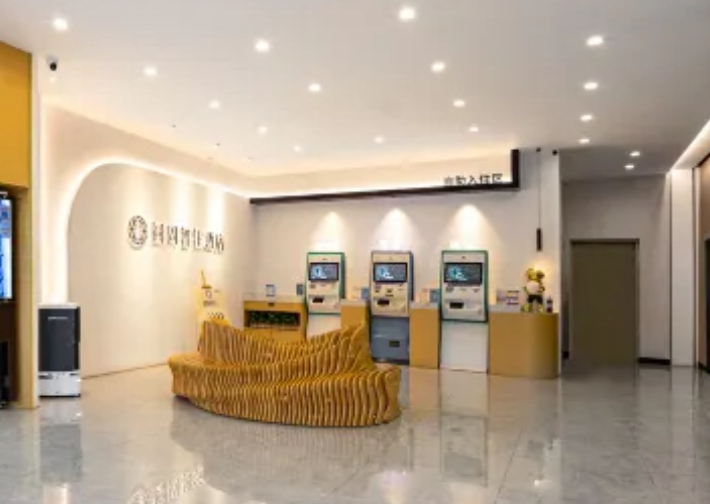
A self-service lobby and check-in kiosk

Skipped-stay control

With Cloud PMS rate and folio control, and payment connected directly, fewer charges are missed, fewer stays skip the system, and fewer folio arguments start.

  • Rate control and a folio check, so an odd order is easier to see.
  • QR payment and a refund back the same way, so fewer holes in cash taken by hand.
  • It follows the desk and the night audit. The skipped-stay pieces can be checked hotel by hotel.
Skipped-stay control on the PMS room board, desktop and phone

Inspection assistance

Maitian AI sits on the quality loop. It helps spot a problem in the photos and follow the fix, so a quality check can be traced.

  • Plan, score, report, fix, and look again still go through the quality loop.
  • Maitian AI drafts the fix. A person confirms it before it is treated as done.
  • Photos on the phone, the report on the desktop, so the group can spot-check.
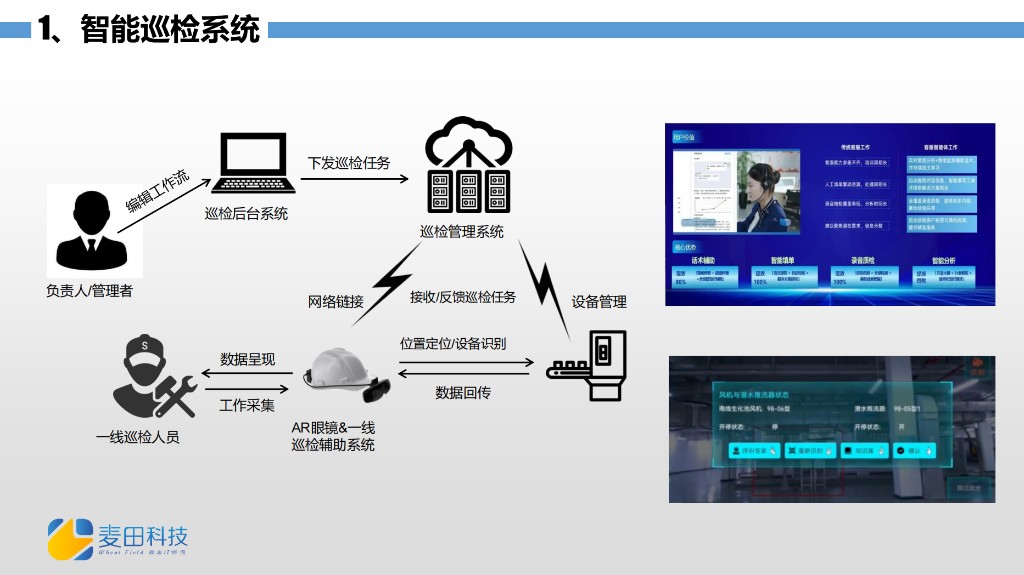
Inspection: tasks sent from the back office, collected on site, and returned by the device
How to choose modules
One hotel, more revenue: PMS, mobile PMS, and direct sales. Restaurants: POS and QR ordering. A chain: CRS plus GMS, standards, quality checks, and tasks. A new hotel: development, fit-out, and pre-opening. Lower purchasing cost: the shop.
Next
Customers · Solutions · Maitian AI · Contact · 400-0811-138

Want to see how these systems would fit together?

Call. We will suggest a mix from the number of hotels and how the organization is set up.

Call